
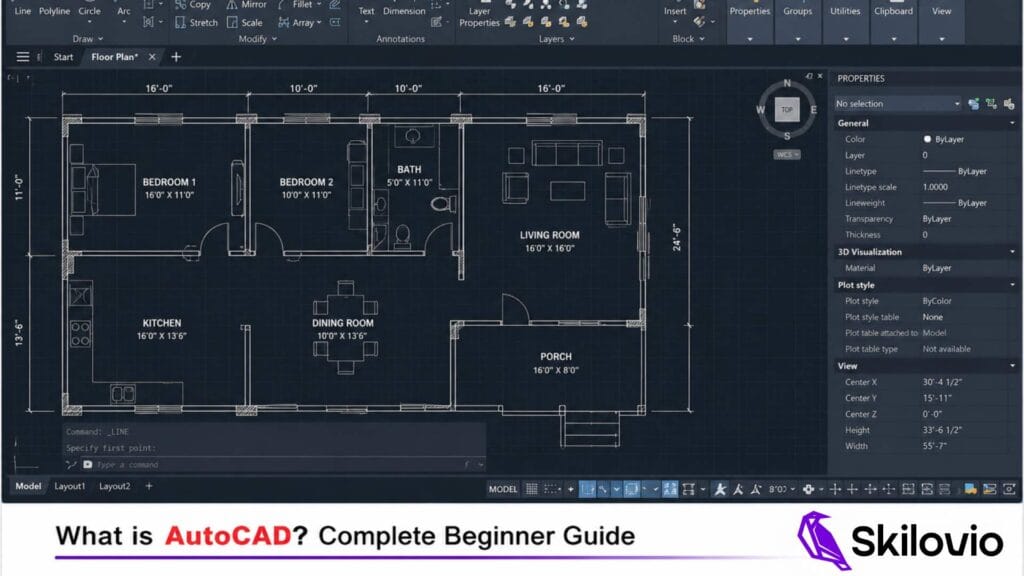
What is AutoCAD? Complete Beginner Guide (2026)
If you’re wondering what is AutoCAD, it is one of the most widely used CAD software applications in the world.
AutoCAD is developed by Autodesk and is one of the most widely used CAD software applications worldwide. Readers can learn more about AutoCAD software from Autodesk’s official website. AutoCAD Overview by Autodesk
AutoCAD is one of the world’s most popular Computer-Aided Design (CAD) software applications developed by Autodesk. It is widely used by architects, civil engineers, interior designers, mechanical engineers, and construction professionals to create precise 2D drawings and 3D models.
Before AutoCAD, technical drawings were created manually using drafting boards and drawing instruments. Today, AutoCAD enables professionals to design faster, improve accuracy, and make modifications easily.
Whether you are a student, engineer, architect, or interior designer, learning AutoCAD can significantly improve your career opportunities and technical skills.
What is AutoCAD?
AutoCAD is a professional CAD software developed by Autodesk for creating technical drawings, engineering plans, construction documentation, and 3D models.
The name AutoCAD stands for Automatic Computer-Aided Design. The software helps users create accurate designs digitally instead of drawing everything manually.
AutoCAD is considered an industry-standard software and is used by millions of professionals across the world.
Key Features of AutoCAD
- 2D Drafting and Documentation
- 3D Modeling
- Layer Management
- Dimensioning Tools
- Annotation Tools
- Block Libraries
- PDF Export
- DWG File Support
These features make AutoCAD one of the most powerful design software solutions available today.
What is AutoCAD Used For?
AutoCAD is used in multiple industries for technical design and drafting purposes.
Architecture
Architects use AutoCAD to create:
- Floor Plans
- Elevations
- Sections
- Site Plans
- Construction Drawings
Civil Engineering
Civil engineers use AutoCAD for:
- Building Plans
- Road Design
- Drainage Layouts
- Structural Drawings
- Infrastructure Projects
Interior Design
Interior designers use AutoCAD to prepare:
- Furniture Layouts
- Space Planning Drawings
- Lighting Plans
- False Ceiling Drawings
- Interior Construction Drawings
Mechanical Engineering
Mechanical engineers use AutoCAD for:
- Machine Components
- Mechanical Assemblies
- Manufacturing Drawings
- Product Design
Electrical Engineering
Electrical professionals use AutoCAD for:
- Electrical Layouts
- Wiring Diagrams
- Control Panel Drawings
- Power Distribution Plans
Understanding what is AutoCAD and how it works is important for students and professionals.
Why is AutoCAD Important?
AutoCAD has become one of the most important software tools in the engineering and design industry.
Improved Accuracy
Digital drafting reduces human errors and increases precision.
Faster Design Process
Designers can create and modify drawings much faster than traditional drafting methods.
Easy Modifications
Changes can be implemented quickly without redrawing the entire project.
Industry Standard Software
Most engineering, architecture, and interior design companies use AutoCAD.
Better Collaboration
Digital drawings can be shared instantly with clients and project teams.
Who Should Learn AutoCAD?
AutoCAD is suitable for various professionals and students.
Civil Engineering Students
Learning AutoCAD can improve employability and technical skills.
Architects
AutoCAD is a fundamental software for architectural design and documentation.
Interior Designers
Professional interior designers use AutoCAD extensively for project documentation.
Mechanical Engineers
Mechanical engineers use AutoCAD for manufacturing and product design.
Diploma Students
Technical diploma students can gain a competitive advantage by learning AutoCAD.
Working Professionals
Professionals looking to upgrade their technical skills can benefit significantly from AutoCAD training.
Benefits of Learning AutoCAD
Learning AutoCAD offers numerous advantages.
Better Career Opportunities
Many companies actively seek professionals with AutoCAD skills.
Higher Employability
AutoCAD certification and practical knowledge improve job prospects.
Freelancing Opportunities
Many professionals earn additional income through freelance drafting projects.
Professional Growth
AutoCAD skills often lead to promotions and increased responsibilities.
Global Demand
AutoCAD is recognized and used worldwide.
Career Opportunities After Learning AutoCAD
AutoCAD opens doors to multiple career paths.
CAD Designer
Creates technical drawings and design documentation.
Draftsman
Produces detailed engineering and construction drawings.
Civil CAD Technician
Supports civil engineering and infrastructure projects.
Interior Design Draftsman
Creates professional interior design documentation.
Design Engineer
Develops technical solutions and engineering designs.
BIM Technician
Works on modern building information modeling projects.
Freelance CAD Professional
Provides drafting services independently to clients and firms.
AutoCAD Salary in India
The salary of AutoCAD professionals depends on experience, industry, and location.
Freshers
Entry-level professionals can secure opportunities in engineering firms, architectural consultancies, and construction companies.
Mid-Level Professionals
Professionals with experience often handle larger projects and earn significantly more.
Experienced Professionals
Senior CAD specialists and design engineers can command attractive compensation packages due to their expertise.
In addition to full-time employment, many AutoCAD professionals also work on freelance projects.
How Long Does It Take to Learn AutoCAD?
The learning period depends on your goals and practice schedule.
- Basic AutoCAD Skills: 2–4 weeks
- Intermediate Skills: 1–3 months
- Professional-Level Skills: 3–6 months
Consistent practice and project-based learning are the fastest ways to master AutoCAD.
Frequently Asked Questions
Is AutoCAD difficult to learn?
Many beginners ask what is AutoCAD and whether it is difficult to learn.
No. AutoCAD is beginner-friendly when learned through structured training and practical exercises.
Can beginners learn AutoCAD?
Yes. AutoCAD is suitable for complete beginners, students, and working professionals.
Is AutoCAD still in demand in 2026?
Yes. AutoCAD remains one of the most widely used CAD software applications worldwide. And that’s what is AutoCAD mainly used for.
Which industries use AutoCAD?
Architecture, Civil Engineering, Interior Design, Mechanical Engineering Electrical Engineering, Construction, Manufacturing.
Is AutoCAD useful for interior designers?
Absolutely. AutoCAD is one of the most important software tools used by professional interior designers.
Learn AutoCAD with Skilovio
If you are looking for a practical and beginner-friendly AutoCAD course, Skilovio’s AutoCAD Masterclass is designed for students, engineers, architects, and interior designers.
The course covers essential AutoCAD concepts, drafting techniques, practical projects, and real-world workflows to help learners build industry-ready skills.
Whether you want to start a career in engineering, architecture, or interior design, learning AutoCAD can be one of the most valuable investments in your professional future.
Learn AutoCAD on Skilovio – AutoCAD 2D Masterclass
AutoCAD Course in Malayalam – Syllabus
AutoCAD is developed by Autodesk.